
Integrate Receipt Bot with XERO
You can create an automated end-to-end data entry process for your bills, receipts and sales invoices by integrating Receipt Bot into your Xero accounting software.
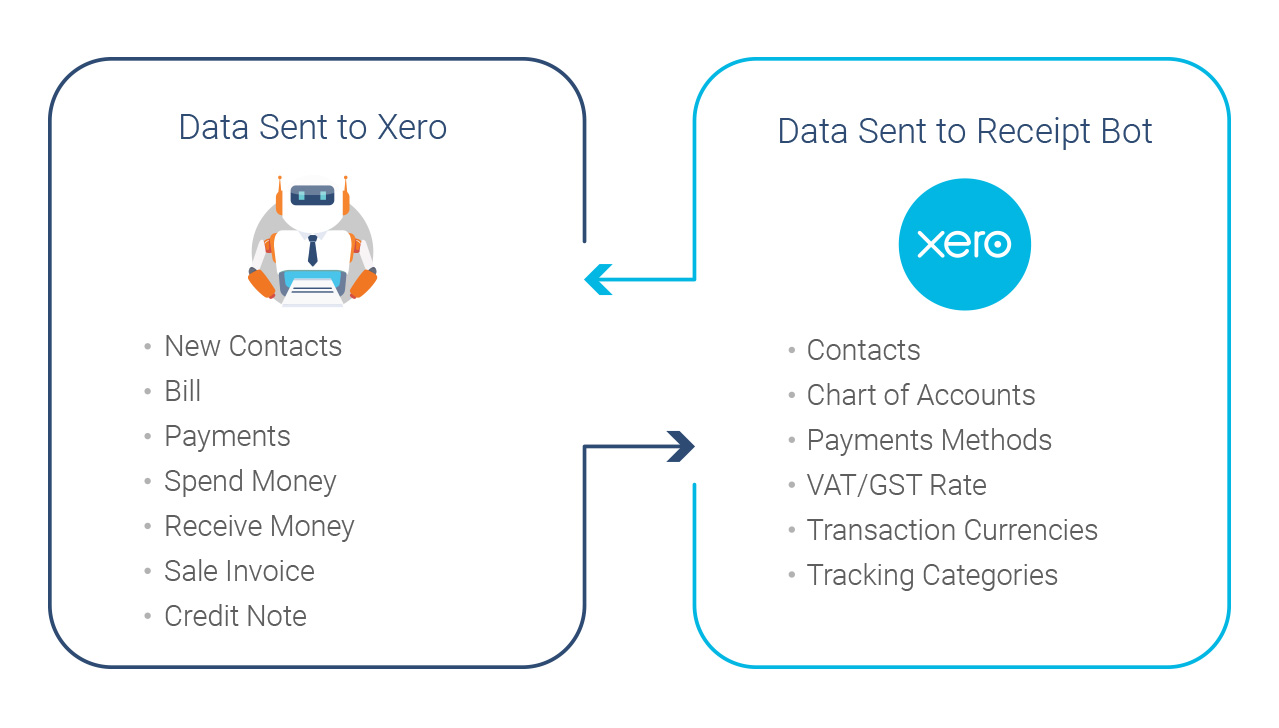
Data flow between Xero and Receipt Bot
When you connect your Xero account with Receipt Bot, data flows in both directions to keep your records accurate and up to date.
Steps to Integrate with Xero
Step 1 – Click the Business Configuration option from the business menu, and navigate to the “Integrations” page.
Step 2 – Click the ‘Connect to Xero’ button.
Step 3 – Enter your Xero credentials.
This step will be skipped if you are already signed in to Xero.
Step 4 – Select the relevant organisation you want to integrate with Receipt Bot.
If you have only one organisation in Xero, then it will be selected by default.
Note: If the relevant organisation is not available for selection, please skip this step.
Step 5 – Click the ‘Allow Access’ button to authorise Receipt Bot.
Step 6 – Select the relevant organisation once again to confirm the integration.
This confirmation step appears only if you have multiple Xero organisations integrated with Receipt Bot.
Receipt Bot should now be integrated with Xero.
You should see a success message and a summary of data imported from your Xero organisation.
After your business is integrated with Xero, all changes made to your master data in Xero are synced with Receipt Bot upon each login to the relevant business in Receipt Bot.
The integration will remain valid for the next ninety days. This expiration time will be extended each time you log in to the business.
Common Issues during Xero Integration
The following is a list of common issues that can appear during the integration with:
- The “Base Currency” is different between Xero and the Receipt Bot. As a result, the system prevents exports to avoid discrepancies in transaction amounts.
- An incorrect organisation was selected during the integration process.
The solution is to create a new business in the Receipt Bot. If you have already processed some documents, please contact the support team via web chat to transfer those documents.
Integration using the Receipt Bot Mobile Apps
Receipt Bot mobile apps do not currently allow integration with any accounting software.
Frequently Asked Questions
Q: Can I integrate Receipt Bot with multiple external accounting software?
A: Receipt Bot allows integration with only one external accounting software at a time.
Q: Do contacts, charts of accounts, and tracking categories auto-sync between Xero and Receipt Bot?
A: Receipt Bot automatically syncs your master data from Xero. The master data includes contacts, charts of accounts, and tracking categories.
Q: Why did my Xero and Receipt Bot integration get disconnected?
A: When the integration breaks, the system typically shows a temporary disconnection message. Common reasons for this include:
– The same Xero business was connected to a different Receipt Bot account, which disconnected the original integration.
– You have not logged in for over 90 days, causing the security authentication to expire.
– Your subscription has been cancelled or your account has been deleted, which results in the removal of the integration.
If your integration continues to break for other reasons, please contact our support team.
Q: What happens if I have a large number of contacts in Xero?
A: To ensure optimal performance, Receipt Bot has a limit on contact syncing.
– If your Xero account has more than 5,000 total contacts, Receipt Bot will only import contacts marked as suppliers.
– If you have more than 5,000 suppliers, the system will only import the first 5,000.