Bug Fixes to Improve User Experience
Published: 7 Nov 2025
Our latest release focuses on bug fixes and stability to enhance the user experience.
✨ New Features
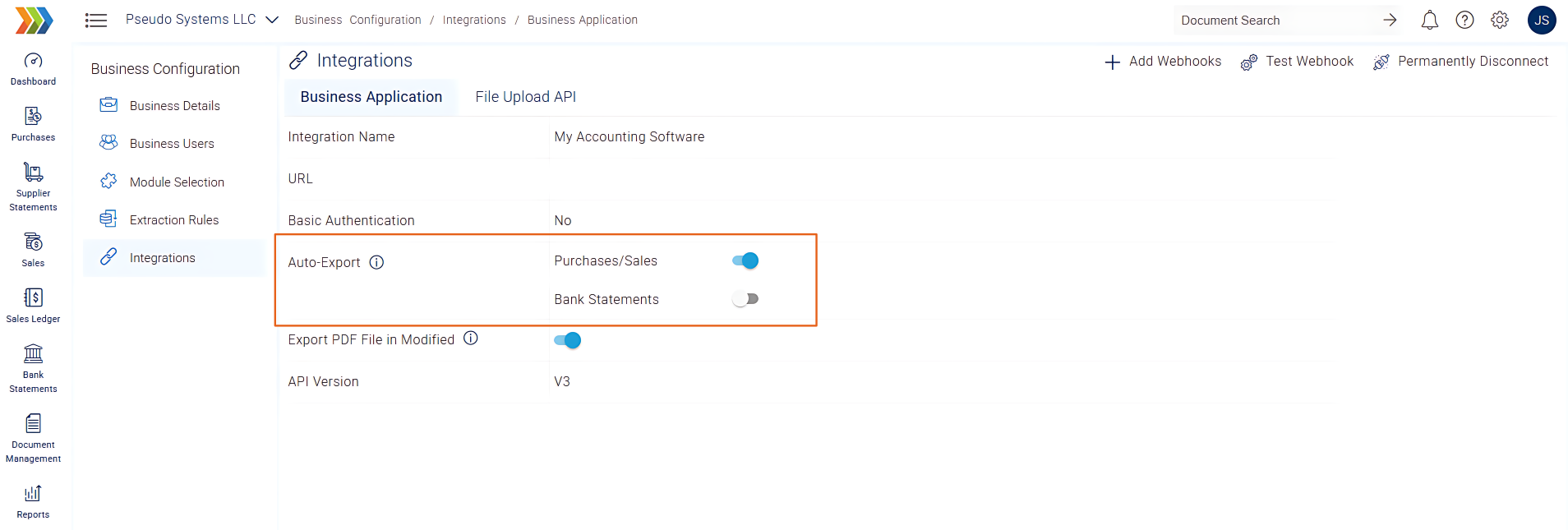
Granular Auto-Export Settings for Invoices and Statements
If you have set up API workflows that require invoice data but not bank statement data, you can enable/disable the events directly within the app.
Receipt Bot provides separate auto-export settings specifically for invoices (both purchase and sales) and bank statements.
“Notes” Field Visibility in Main Document Grid
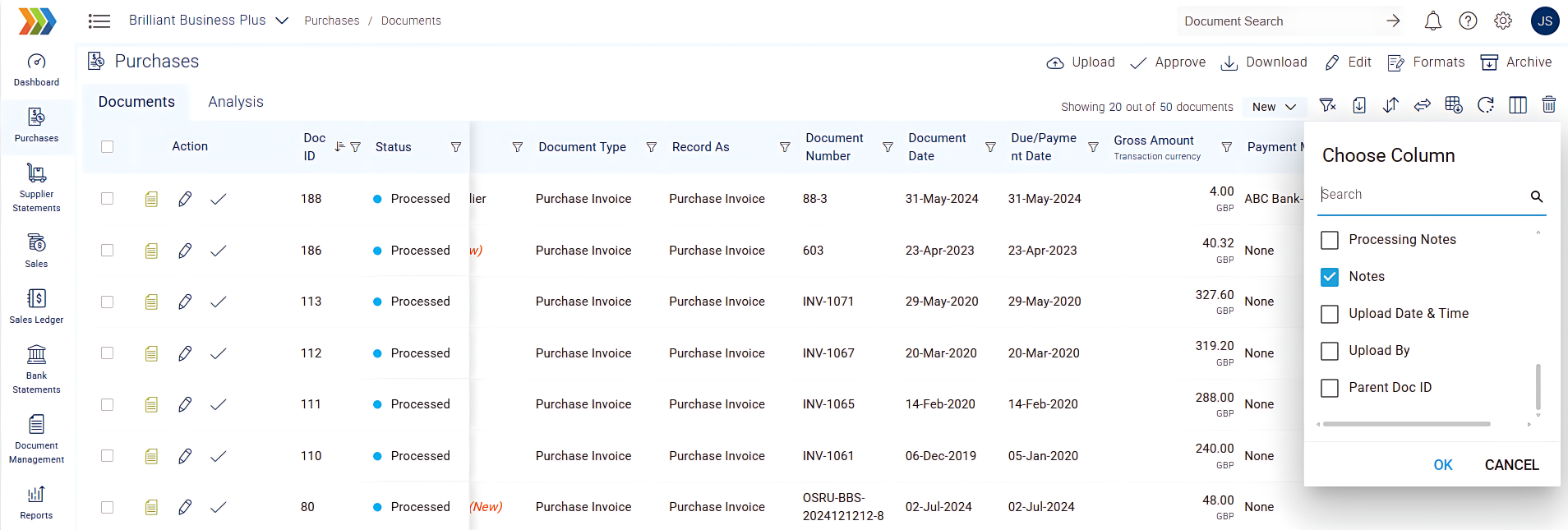
The notes attached to documents were previously only visible upon opening the document details. This required extra clicks and could slow down document review workflows, especially for users needing quick context.
A new “Notes” field has been added directly to the main document grid. You can now quickly glance at important information or internal comments associated with each document without needing to open its details.
Copy Icon for Invoice Description
We’ve added a convenient “copy icon” next to the description cell on the Invoice Details pop-up. A single click will now copy the full description to your clipboard. This small but powerful addition significantly speeds up data transfer and reduces manual effort when working with invoice details.
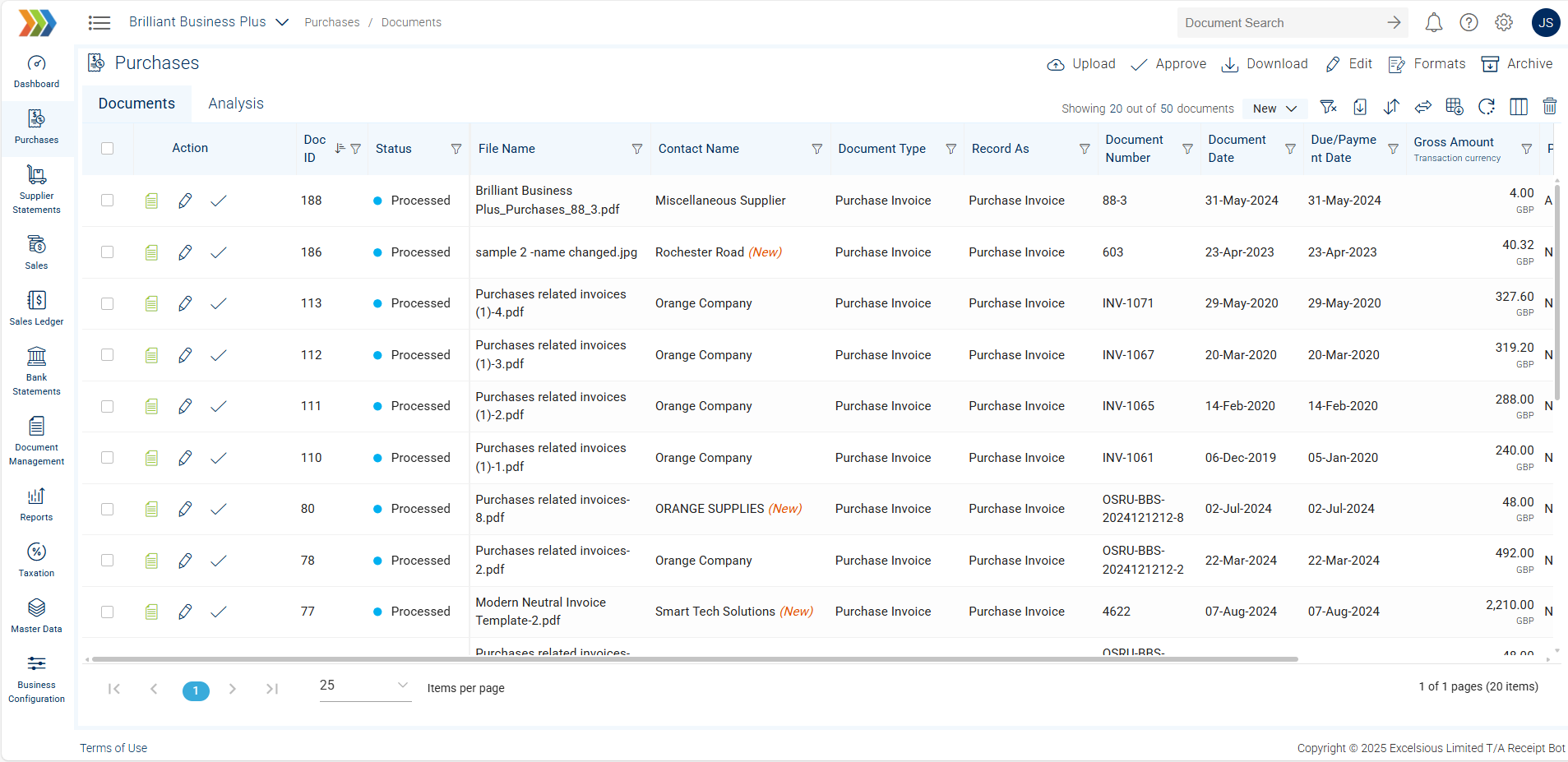
“New” Indicator for Contacts
The contact column in the document and analysis grid now displays “(New)” next to recently added contacts. This subtle visual cue helps you quickly identify and review new contacts, speeding up the review process.
Open Parent Documents in New Tab
When viewing a child document (e.g., a credit note) and needing to access its parent document (e.g., the original invoice), navigating to the parent document would often replace your current view, causing you to lose context of your original task.
You can now click to open parent documents in a new browser tab. This enhances your workflow by allowing you to simultaneously view related documents without losing your place or interrupting your current task, making cross-referencing much more efficient.
🛠️ Bug Fixes
- Introduced a warning pop-up to prevent accidental data loss when leaving a document without saving changes.
- Optimised the PDF splitting process, significantly reducing the file size of split documents, which were very large in some cases.
- Resolved multiple functional and UI issues in the Supplier Statement and Sales Ledger modules, improving bulk creation, payment method dropdowns, and “Record As” options.
- Correctly display the names of Payment Methods in the filter instead of their internal IDs.
- Removed the unnecessary ‘Please Select’ option from the Sales ‘Record As’ dropdown in Extraction Rules, preventing invalid selections.
- Added visual loaders when changing pagination record counts on client-side grids, providing better feedback during data loading.
- Corrected the chargeable page calculation for “PDF Image to Text” documents, ensuring accurate billing.
- Updated the messaging when attempting to approve already approved documents to provide clearer feedback.
- Resolved an issue where leading zeros were lost when editing payment methods from the Master Data grid.
- Addressed multiple issues related to Tracking Categories in Sales Invoice Analysis, ensuring accurate reporting.
- Ensured that the document grid and filter state for Bank Statements are now retained after returning from a detail view, improving navigation continuity.
- Resolved general issues affecting Master Data updates, ensuring consistent and reliable data management.
- Implemented various UI and alignment improvements on the Practice Management page for a cleaner and more consistent look.
- Resolved an issue where re-export to Sage One failed after changing a document’s “Record As” type to Spend/Received Money, allowing for flexible re-export options.
- Enabled automatic selection of document rows in the Recycle Bin when navigating via “View Parent ID”.
- Implemented restrictions to prevent editing of reconciled supplier statements and sales ledger documents.
- Corrected an issue where bank details were unnecessarily required for PayPal and Cash payment methods, streamlining setup.
- Ensured that Master Data fields (like address, default COA) automatically update when a contact is changed on a document, promoting data consistency.
- Ensured that bank statement Excel downloads now correctly include bank details even when no transactions are present.